
On one device
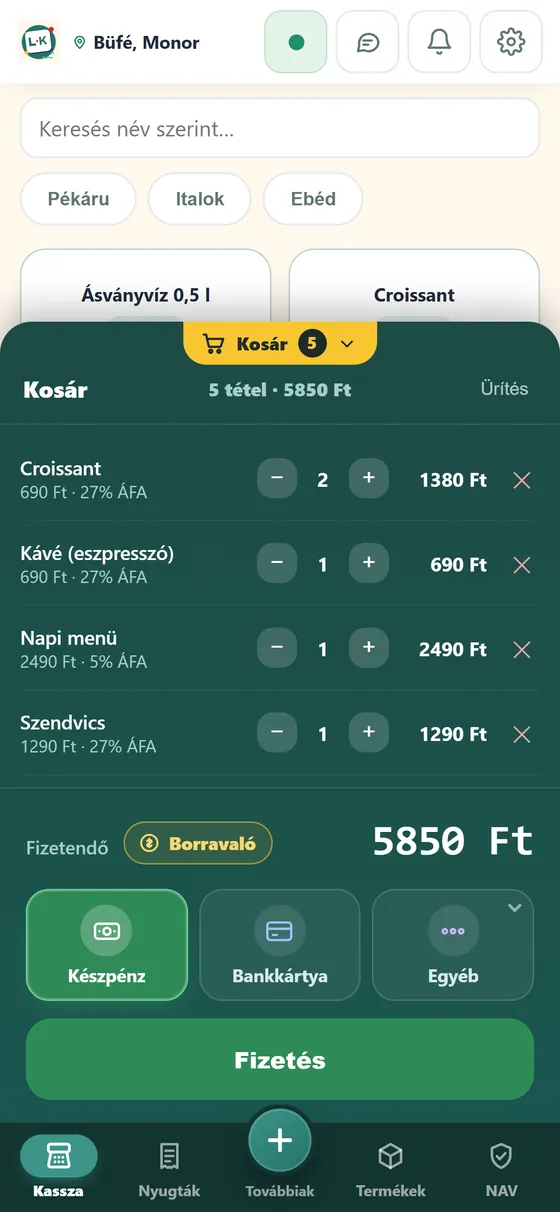
The receipts, products and card payments are all on the same terminal; you do not need a separate device.
Raiffeisen terminal
L-Kassza runs on the Raiffeisen terminal, and the Raiffeisen payment app handles the card payment. The system creates the receipt and the daily NAV summary, and you can manage products and reports on the web as well.
A few minutes, no bank card needed.

What you get
The receipts, products and card payments are all on the same terminal; you do not need a separate device.
L-Kassza passes the cart total to the Raiffeisen payment app. Reading the card, the PIN and the bank’s approval happen there, and the result returns to the POS.
The system sends the daily summary to NAV, and you can manage products and reports on the web as well.
Direct subscription: there is a free plan for up to 10 receipts a day, and the full plan costs 10,000 HUF net per month.
For Raiffeisen card acceptance customers whose terminal runs Android.
How it works
You sign up on the sign-in page that belongs to your terminal. If the channel needs an invitation code, your contact person gives it to you.
You install L-Kassza from the terminal’s own app store.
For this you need the technical user you received from NAV.
Amount or products into the cart, payment on the terminal, receipt at the end.
FAQ
Yes. The bank card terminal or payment app handles the card payment: L-Kassza passes the amount and gets the result back. The receipt is created after a successful payment.
No. Reading the card, the PIN and the bank’s approval all happen on the terminal or in the payment app. L-Kassza only passes the amount and receives the result; no card data reaches it.
From the terminal’s own app store. On an Android phone or tablet you can install it from Google Play.
The free plan covers up to 10 receipts a day. The paid plans cost 2,000 HUF, 4,000 HUF and 10,000 HUF net per month + VAT; with annual payment you use 12 months for the price of 10.
The NAV technical user’s name, password, signing key and exchange key; you can enter them in the web portal. If you do not have them yet, selling still works, and you switch on reporting later.
Signing up takes a few minutes, and you can issue receipts right away.